
How to Find, Check and Price a Winning Product
SellerAmp SAS helps you answer 3 key arbitrage questions: Can I sell it? Does it sell? Is it profitable? Our tool is loaded with powerful features that pull the data you need in seconds, so you can spend less time researching and more time sourcing. This page walks you through answering all three using the real tools inside SAS.
Finding Products – Storefront Search
Keeping up with competitors and finding new products and sources is a regular part of sourcing. SellerAmp SAS Storefront Search lets you see SAS analysis for the products in any seller’s storefront.
Access Storefront Search
Easily see the products, brands and categories in any seller’s Amazon storefront.
Learn how to use Storefront Search
Start with beginner-friendly categories that don’t have heavy restrictions: Beauty, Health, Household, Grocery. Look for websites offering deals and coupons you can use when buying inventory to maximize your profit.
Found a potential product?
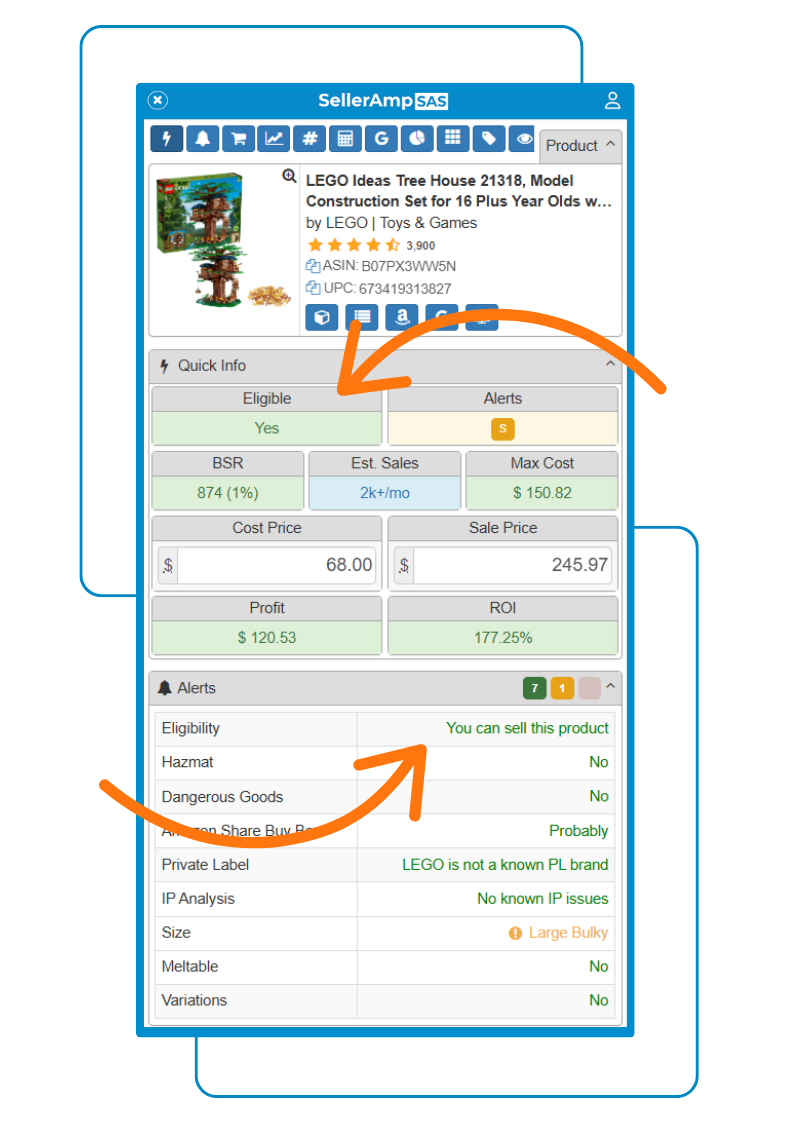
Verify its profitability in SellerAmp SAS’s Quick Info Panel, which surfaces the most important data points right at the top of your analysis.
Pro tip: look for 3–30 competitors, a BSR under 100,000 (or 0–1%), and $3+/£3+ profit or 30%+ ROI.
Can I Sell It? – Getting Ungated
As a new seller, understanding gated vs. ungated products is essential. Amazon restricts, or “gates,” some products to protect brands and customers from things like counterfeit items and to uphold safety standards. When you’re eligible to sell something, it’s “ungated.”
Why get ungated:
- Less competition, since not everyone can sell the same products
- Potentially higher profit margins
- Access to premium brands and hot categories
How to get ungated:
- Check whether you’re already ungated for a product using the SellerAmp SAS Alerts Panel; the Eligibility box shows whether you’re eligible.
- If you’re not eligible, request approval. In Seller Central, go to Catalog > Add Products, search by ASIN, barcode, part number, or name, then click “Show Limitations” and “Apply.” Pro tip: if “apply to sell” isn’t showing, Amazon likely isn’t accepting new sellers in that category right now.
- You may be asked for documentation, invoices, product photos, or compliance documents. Some applications are auto-approved. Pro tip: if you’re rejected, don’t panic. You can often reapply with better documents.
Invoice submission tips: Your name should match your seller account. Your billing address should match your seller account. Show a purchase of at least 10 units of the same product. If a store doesn’t provide an invoice, contact them to get one.
How to Get Ungated
Watch 7-figure seller Warner (@FieldsofProfit) show exactly how to get ungated on Amazon.
Does It Sell? – What to Check
Choosing winning products among endless options can be challenging. Here are the key characteristics to check as you source.
- Optimal competition: check the Offers Panel for all sellers, their inventory, and prices
- Best Seller Rank (BSR): look for a BSR under 100,000 or 0–1%, visible in the SAS Ranks & Prices Panel. Lower means faster sales and more popularity
- Pricing power: until you’re familiar with fees and costs, target products selling for over $25 to give yourself room for unexpected costs
- Profitable margins: target $3+/£3+ profit or 30%+ ROI
- All-in costs: factor in sales tax, prep fees, and shipping costs. Pro tip: save these in your SellerAmp Profit Calculator
- Customer satisfaction: opt for products rated 3 stars or above
- Amazon seller percentage: check the Buy Box Analysis Panel; select products where Amazon has held the Buy Box 25% or less over the last 3 months
- Consistency with charts: use historical data to spot products with consistent pricing trends
How to Analyze Products
Watch Jasmin Green (JasHustles) explain how to analyze a product using SellerAmp SAS.
Is It Profitable? – Using the Calculators
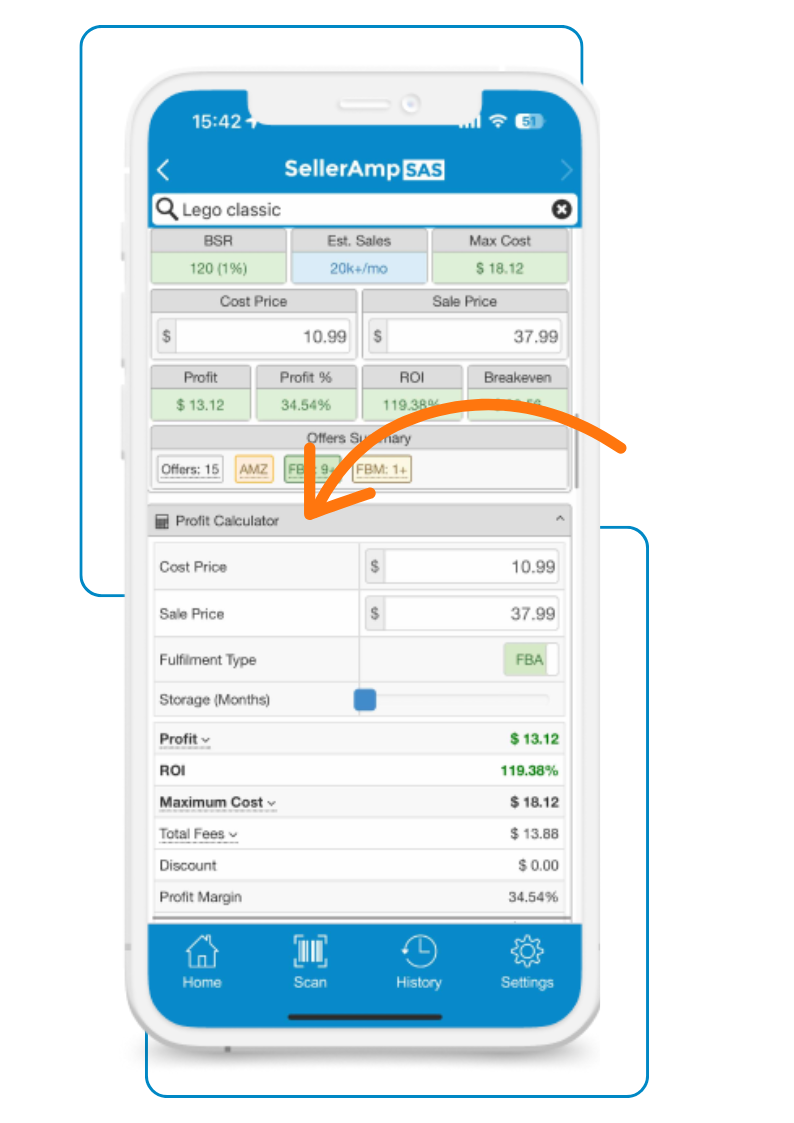
Meet the Profit Calculator: your go-to tool for seeing exactly what you’ll make on a product.
Here’s what the Profit Calculator shows:
Adjustable Details: Tailor your analysis by adjusting the cost price, sale price, FBA storage, and FBM fulfillment costs.
Fulfillment Flexibility: Easily switch between fulfillment types to see how it impacts your bottom line.
Comprehensive Analysis:
- Profit
- ROI (Return on Investment)
- Maximum Cost (the most you should pay)
- Total Fees
- VAT on Fees or VAT Due (where applicable)
- Profit Margin
- Breakeven Sale Price
- Estimated Amazon payout
Quick Info vs. Profit Calculator – Why Both Matter
While Quick Info is handy, the Profit Calculator gives you the complete view, so you can make informed decisions.
Watch the Profit Calculator’s power in action.
Reading the Buy Box, Sales Rank and Historical Data
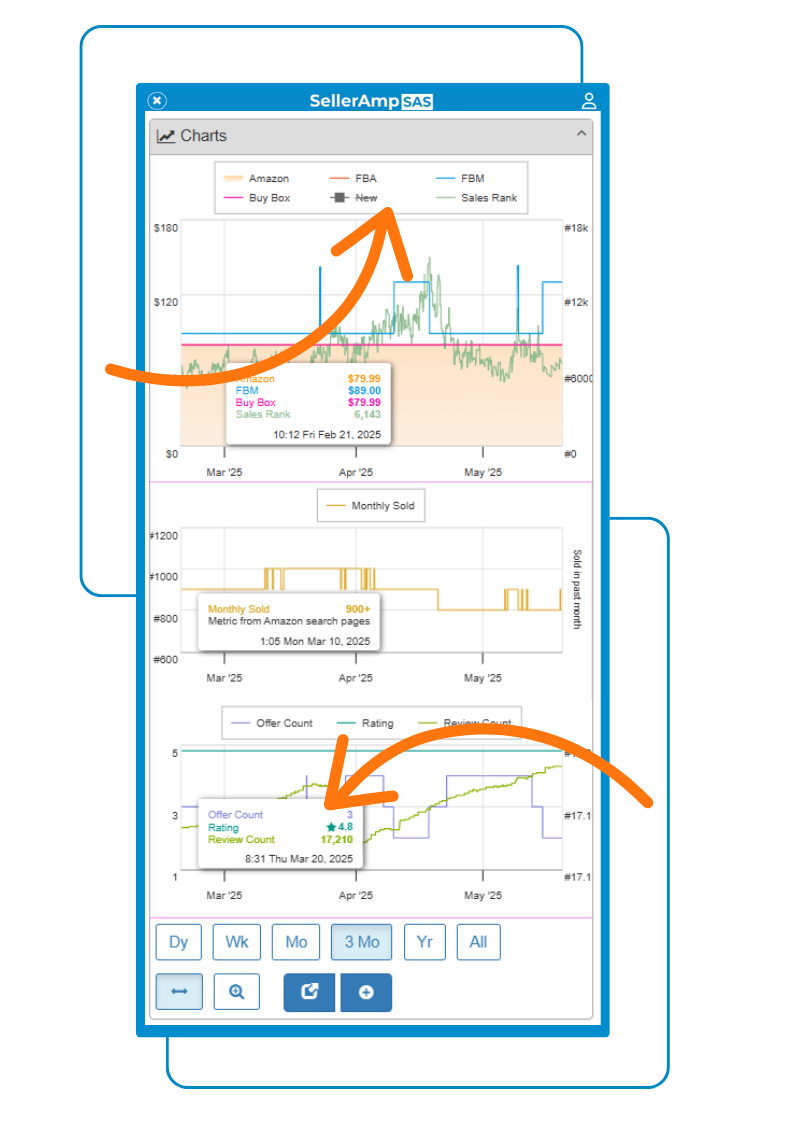
Here are the top 3 sections within the Charts Panel that help you decide if the product you’re sourcing is worth selling:
Buy Box: Make sure the Buy Box price is stable and doesn’t dip dramatically. A steep price drop reduces your chances of making a profit.
Sales Rank: Check for a sales rank below 100k (US) or 30k (other marketplaces). This helps you focus on products that will sell more quickly, so you aren’t left with inventory that isn’t making you money!
Offer Count: Avoid products with steadily increasing offer counts. More offers usually mean prices will drop.
Found something promising?
Before you get excited about that ROI, check your SellerAmp Alerts Panel.
It can quickly flag things you need to investigate:
🚩 Not eligible? You might not be able to sell it at all.
🚩 IP or Private Label warning? Worth a closer look before investing.
🚩 Hazmat or Dangerous Goods? Restrictions could change the picture.
🚩 Meltable? Your selling window may be limited.
🚩 Amazon on the Buy Box? Check just how dominant they are.
And who are you actually competing against?
A profitable product isn’t much use if you struggle to make the sale.
Check the Buy Box data to see who’s competing, the current Buy Box price and whether Amazon itself is on the listing.
Now you’ve got a much fuller picture.
Beginner’s Guide to Online Arbitrage
Flips4Miles breaks down Amazon online arbitrage product research for beginners in the simplest way, using SellerAmp SAS.