SellerAmp SAS Features
SellerAmp SAS offers a wealth of features that enable you to source more successfully, whether RA (Retail Arbitrage), OA (Online Arbitrage), Wholesale or other methods. You find a product, SAS will tell you if it meets your profit and ROI requirements, and so much more.
In seconds, you will get the full and clear picture of the realities of investing in a product.
3 Tools, 1 Product
With the SAS mobile app, Chrome extension and web app, you have the power to understand the profitability of a product…anywhere.
Web App
Full screen view with the web app: deep dive with all the analysis on your computer screen at once through the web app.
Chrome extension
Side by Side view with the Chrome extension: get analysis within your Chrome browser window, while on Amazon or any website. It launches automatically on Amazon sites, and opens with 2 clicks when you highlight text on any other website.
Mobile app
On the go with the mobile app (Android & iOS): the perfect tool for RA. Scan a product UPC or EAN, search by text, or use your device Share feature to open SAS analysis on a product you find in another app.
Full Features List
Watch our explainer video of how to make use of SellerAmp’s most intuitive features yet! Tell SAS your objectives, and let SAS tell you if a product meets your designated goals.
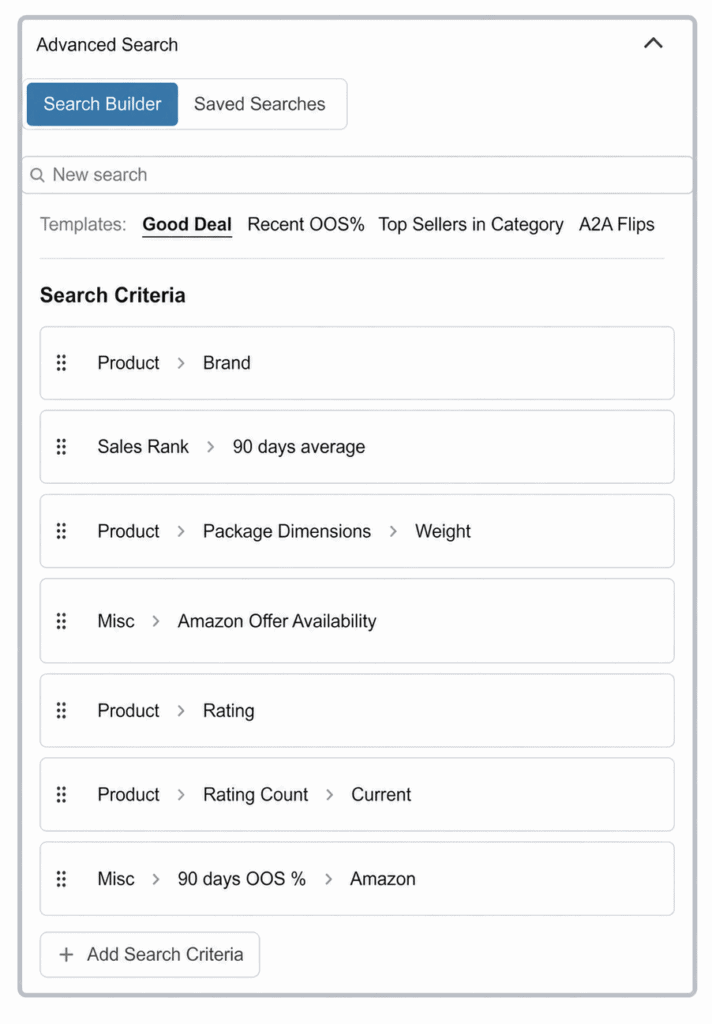
Advanced Search
Advanced Search lets you build powerful custom searches using filters like sales rank, price history, stock levels and more. Save searches, use ready-made templates and share them with your team, all in a few clicks.
- Works for every sourcing method — retail arbitrage, wholesale, Amazon flips, private label and more
- Save hours of manual research every week
- Built for beginner and experienced sellers alike
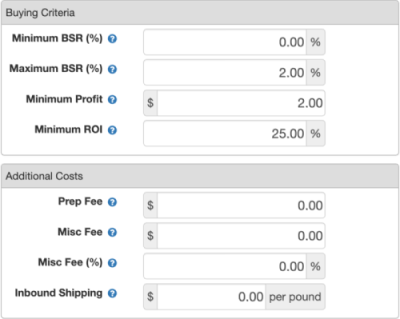
Set Your Objectives & Costs
You set your own business objectives. Tell SAS your objectives in your settings, and let SAS tell you if a product meets your designated goals like:
- Profit
- ROI
- BSR minimum/maximum
SAS also factors in your tax status, additional sourcing costs and inbound FBA shipping rates, once you set up the rates.
SAS Smart Search
Using the SAS Chrome extension on ANY website gets you to your analysis in a single click or keyboard shortcut. And the SAS search results returned are accurate, by drawing on page and product details. Use Smart Search in a variety of situations:
- On a website product page
- On an Amazon product page
- After highlighting text on any web page
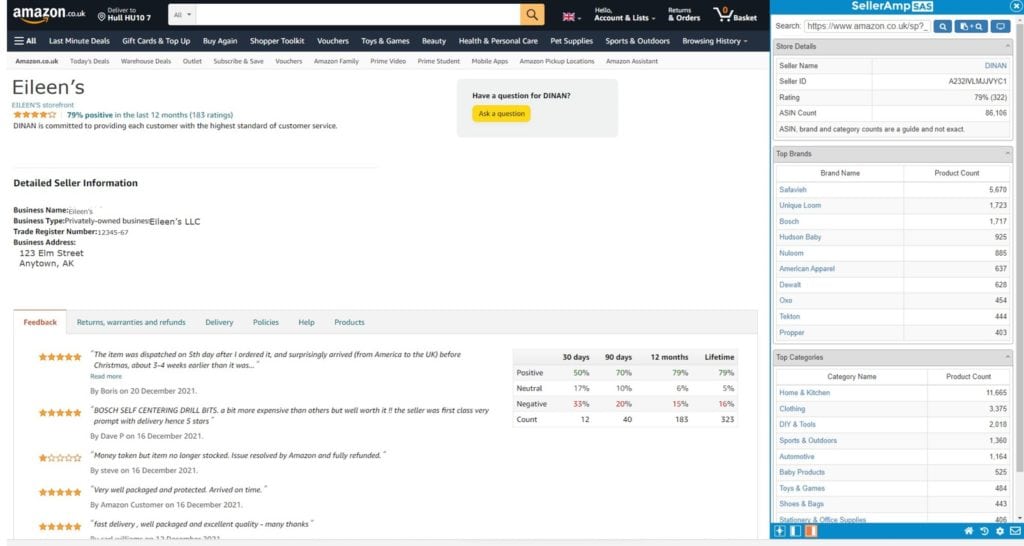
Storefront Search
Staying up to date with your competitors and finding new products and sources are a regular task. SAS Storefront Search enables you to see SAS analysis for the products in any seller’s storefront. View seller details, top brands and top categories in their store. Click on a product to conduct SAS analysis for yourself.
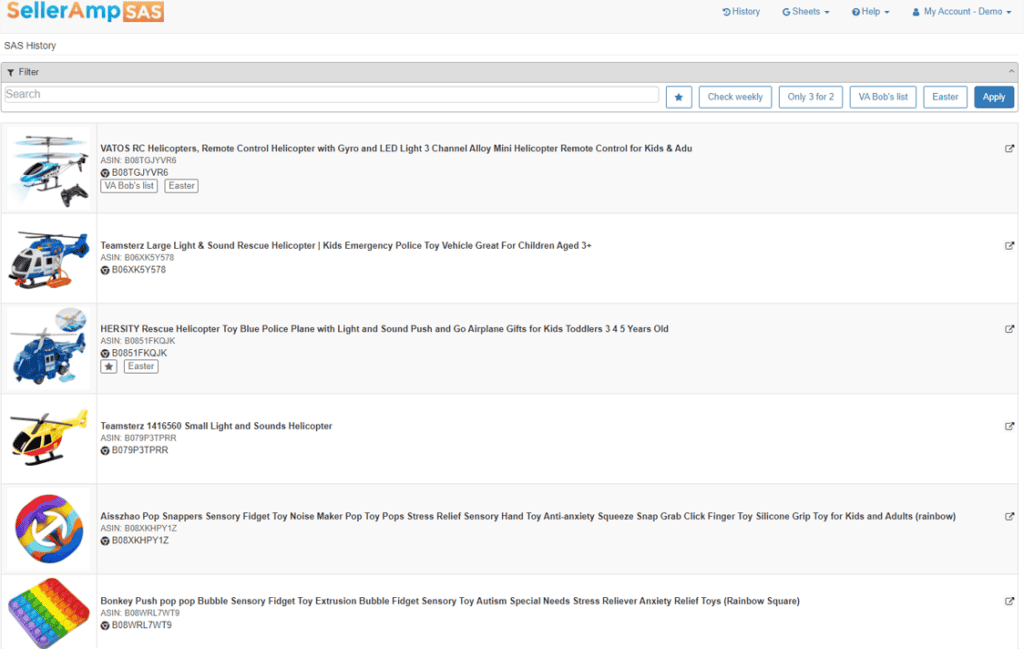
Access Your Analysis History
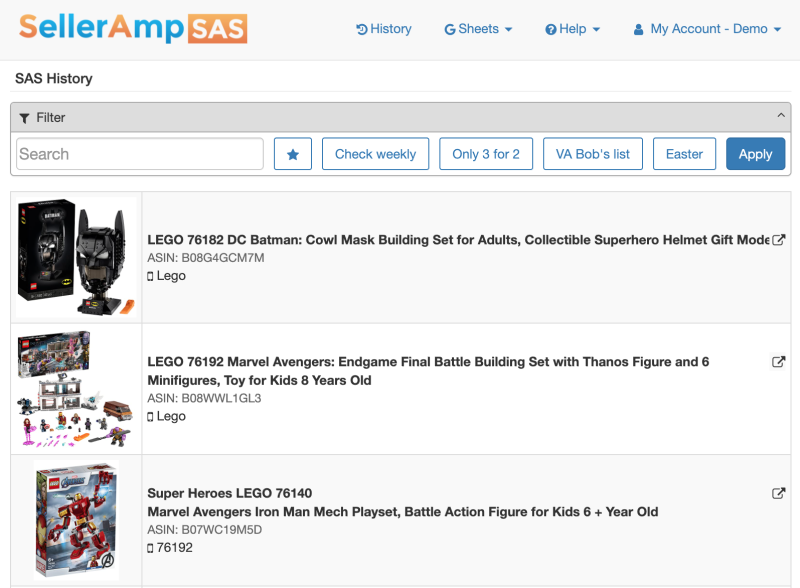
You need to know what products you have analyzed, and be able to revisit them in the future. SAS has you covered with powerful tools to keep your history organized:
- History contains every product you analyze, regardless of tool used, and is easily searchable
- Apply Tags to find products more easily in the future
- Make searchable Notes against each product
- See your Lookup Details including source, cost and sale price used
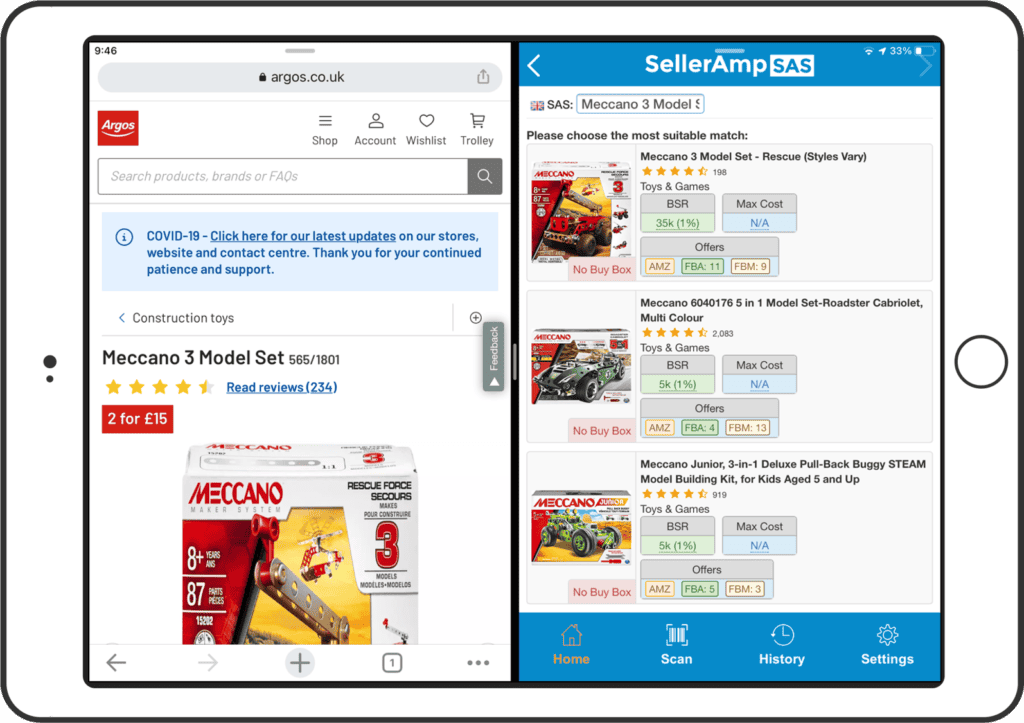
Mobile Share & Split Screen
When browsing on your mobile device, use the share feature to launch SAS instantly. And analysis on your mobile device becomes easier when using split-screen/multi-tasking mode — get a side by side view with SAS plus Seller Central, your reconciling tool or any website.
Speed that Matters
You need to find products fast, buy them and sell them. SAS prioritizes speed with:
- No data entry required to get results
- Automatic Chrome extension launch on any Amazon product page
- One click analysis from all Amazon search results pages
- Apply tags to products for easier filtering
- Lightning fast scanning and results on the mobile app
Enables Comprehensive Analysis
SAS offers helpful and relevant information grouped into panels, making it easy to hone in on the information to answer those ever so important sourcing questions:
Should I sell it? Does it sell? Is it profitable?
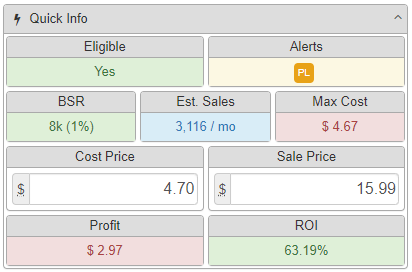
Quick Info
A fast glance at the most critical analysis details so you determine whether to analyze further:
- Eligibility to sell the product
- Maximum Cost (Max Cost)
- Profit & ROI based on your settings
- BSR and whether it meets your requirements
Entering your Cost Price and Sale Price will instantly recalculate the information.
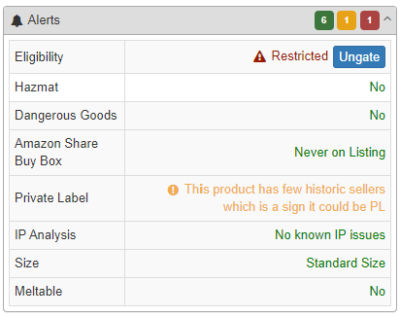
Alerts
See which issues may prevent you from achieving your profit and ROI goals:
- Eligibility to sell the product
- Hazmat and Dangerous Goods notations
- Does Amazon, historically, share the buy box?
- Private Label or IP warnings
Using a simple stoplight format, you will know which Alerts apply to the current lookup.
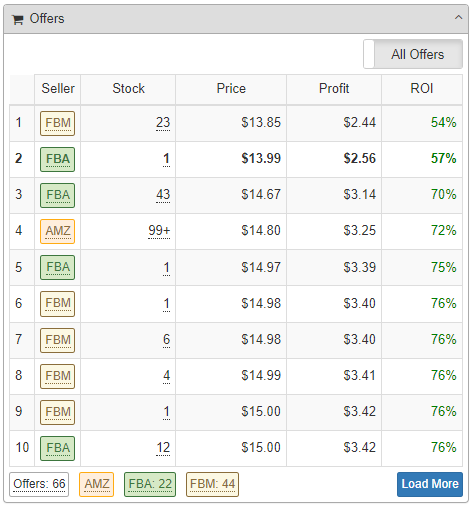
Offers
See important details about other offers for the current product, including:
- Seller name, rating, review count and fulfillment type
- Link from any seller to their Storefront Search
- Current stock levels with min/max order indicators
- Their price, including and excluding shipping
- Your profit and ROI if you matched their price
- Total number of sellers and total by fulfillment type
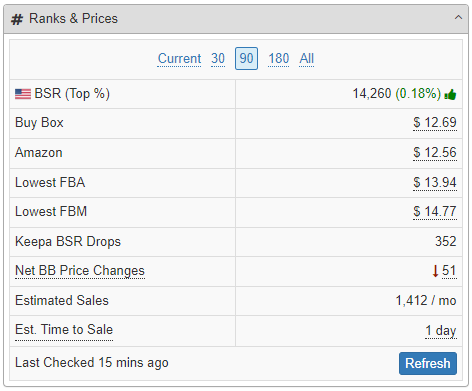
Ranks & Prices
Have full knowledge of how the product sells, both currently and historically:
- Product BSR
- Buy Box, Amazon, lowest FBA and lowest FBM prices
- Net Buy Box price changes and Keepa drops
- Estimated Sales per month and your estimated time to sell
Switch views from current to 30, 90, 180 days or full history.
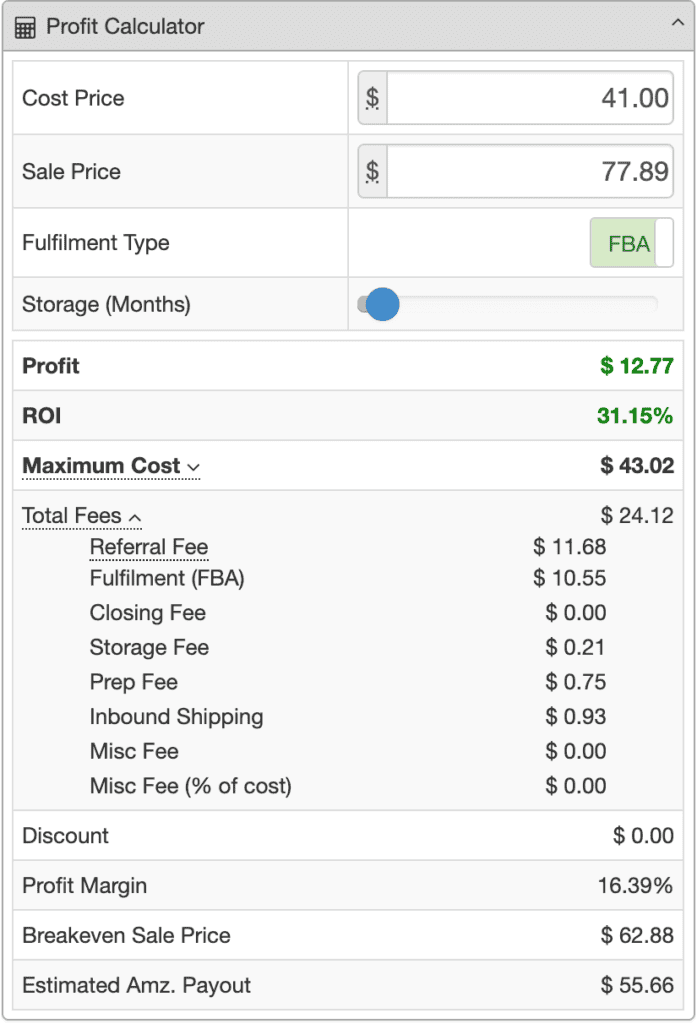
Profit Calculator
See a true view of the possible return on your sourcing investment:
- Will Profit and ROI meet your requirements?
- Adjust Cost Price and Sale Price to see the impact
- Impact of selling FBM vs FBA
- Breakdown of all fees and taxes
- Breakeven sale price, Profit Margin and Estimated Amazon Payout
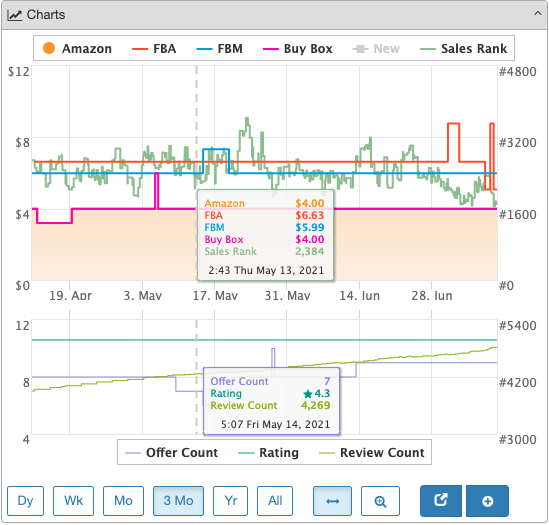
Interactive Charts
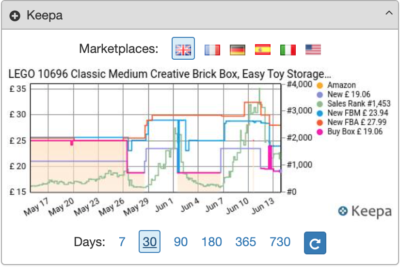
Interactive charts driven by Keepa data to visually wade through historic stats:
- Historic sales rank for a product
- FBA, FBM, Amazon and Buy Box price
- Offer, review counts and rating
- See exact prices and counts at any point; zoom or pan
Keepa
SAS uses data directly from Keepa to show historic data:
- Historic sales ranks
- Amazon and buy box prices
- Lowest FBA and FBM prices
- Quickly switch between date ranges and marketplaces
Notes & Tags
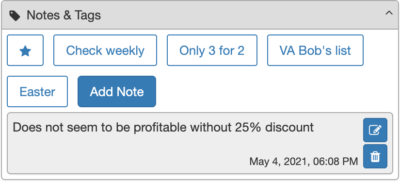
Add your own notes and tags to the analysis:
- Notes: create multiple notes against an ASIN with date/time stamp
- Tags: a single tap to flag an item
- Custom Tags: create and name your own to organize your history
Export to Google Sheets
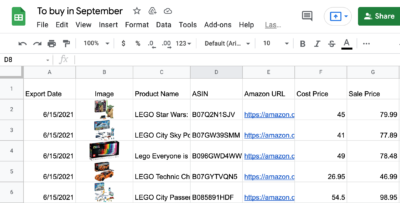
Export your analysis as you go to one or more Google Sheets:
- Export the key fields in the order you want
- Create multiple sheets for different use cases
- Create and export your own Google Sheet formulas
BQool Repricing Central Integration
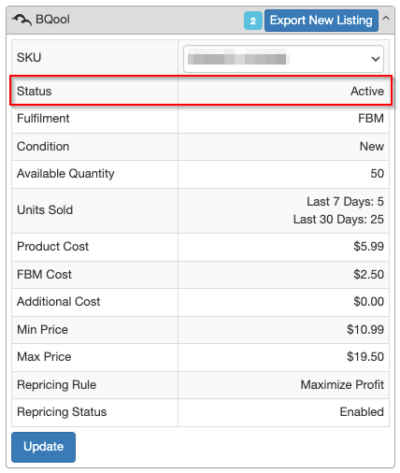
Analyze products, set costs and prices, and establish repricing rules at the same time when connected to a BQool account:
- Sync cost, min & max price, and repricing rules both ways
- Export new listings into BQool as you source
- Marketplaces supported — US, CA, UK, DE, ES, FR, IT
Seller Central
Single click access to your Amazon Seller Central account. Add the product to your inventory, check existing inventory, view pending or past orders, or hit the SC homepage.
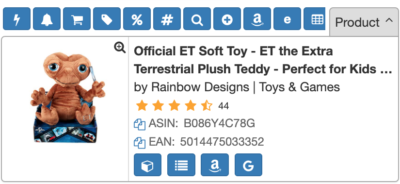
Product Info
Key information about the current product:
- Ratings, images, dimensions, weight, listing bullet points
- Confirm and copy the ASIN and EAN/UPC
- One-click link to the Amazon listing or a Google search
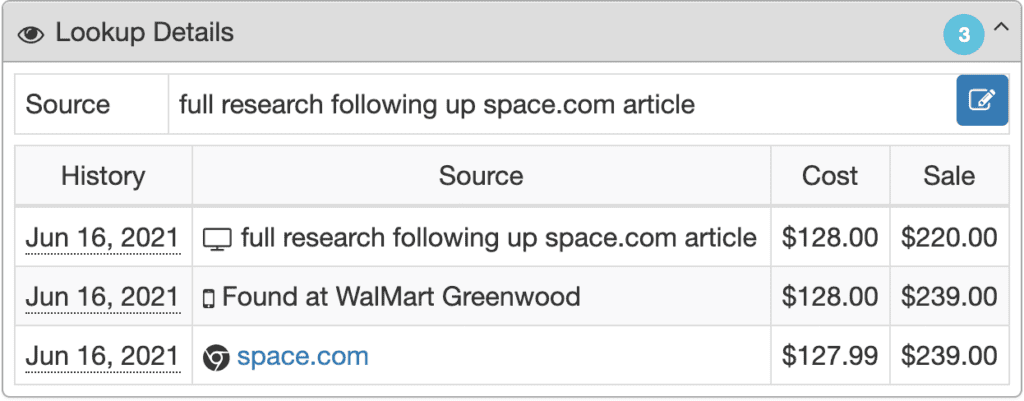
Lookup Details
At a glance, understand if and when you have previously analyzed the product:
- Date and time you last analyzed the ASIN
- Source and which SAS tool was used
- Previous cost and sale price used
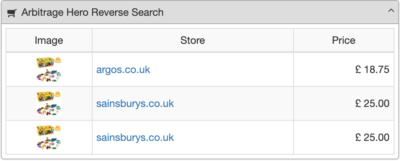
Arbitrage Hero Reverse Search
Reverse Search capability from Arbitrage Hero. Automatically see merchants who sell the product and their price:
- Confirmation your cost is competitive
- See what merchants are selling the product
- Maybe find another source!
Discounts
Does a merchant you are sourcing from have a discount? Select your discount and SAS immediately calculates the impact to your cost, profit, ROI, etc.
eBay
Search the product on eBay to see listings or recent sales, and prospect another possible destination to sell.
European Marketplaces
Get a quick view of the viability of selling in European marketplaces:
- Sales rank, buy box price and fulfillment type
- Profit and ROI at that price with your cost
- Exchange rates automatically updated
- Choose between EFN and Pan-EU fulfilment
Seller Tool Kit
Partnered with SellerToolKit (STK) to show information directly from their STK account:
- Current and inbound Amazon stock levels
- Your price and previous orders
- Sales channels
ROI
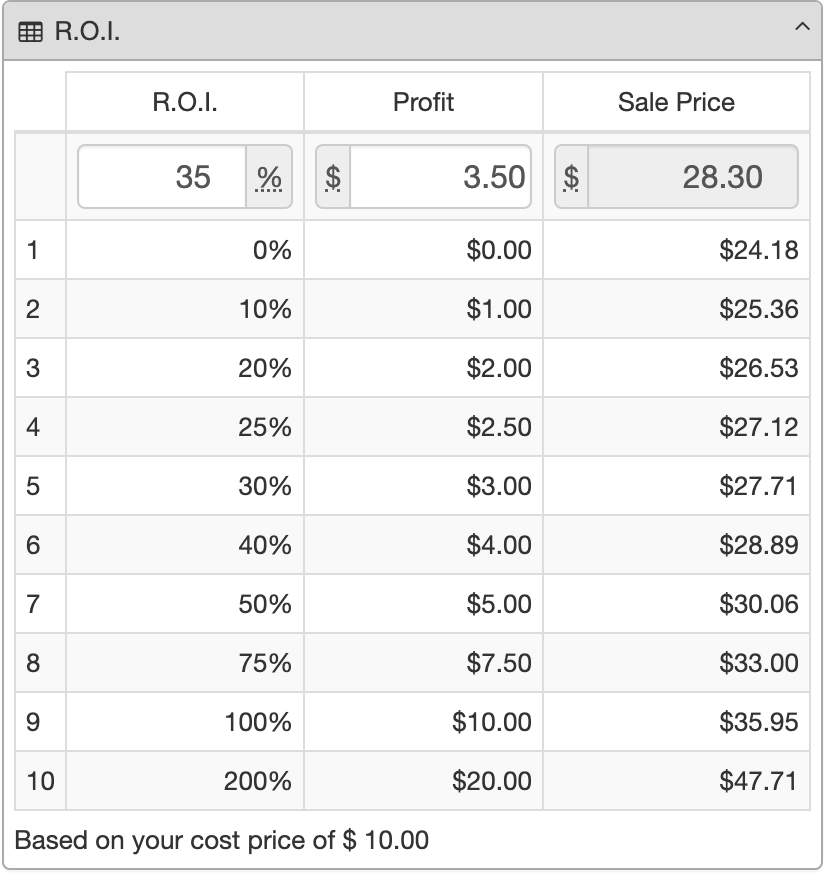
The ROI panel shows the required sale price to generate different ROI percentages:
- Common ROI values calculated and displayed
- Instantly calculate required sale price for your desired ROI
- Enter a desired profit to see the ROI and needed sale price
VAT Settings
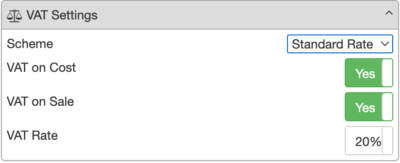
SAS uses your selected VAT Scheme in all calculations. Override the VAT scheme, VAT rate and use VAT inclusive or exclusive prices in this panel.
See How To Use Each Feature
Check out our Resources page for detailed video guides on how to use each feature.
Want to Learn more?
Episode 01 — Beginners Guide to Arbitrage. Learn all about Arbitrage and Selling on Amazon for free, how it can streamline your business and drive growth.