
Manual sourcing can eat up your whole day, especially when you’re bouncing between retailer sites, Amazon listings and calculators. ArbiSource helps you cut through that work by pairing sourcing leads with product research data, a source link, and the matching Amazon listing.
The tool doesn’t replace judgment, but it does give you more leads to evaluate, then SellerAmp SAS helps you check whether the numbers, restrictions, and history make sense.
What ArbiSource Does for Your Sourcing Workflow
ArbiSource is built to find potential online arbitrage leads without having to hunt through every retailer catalog by hand. You can look through price drops, run retailer or category scans, and compare the source price against the Amazon listing.
The main areas you’ll use are:
- Price Drops: A live feed of possible deals.
- Amazon-to-Amazon: For products available on Amazon that may have resale potential.
- Scans: Where you choose stores, categories, keywords, or a seller ID.
- Filters and exclusions: Where you remove leads that don’t match your business.
You aren’t buying from a scan result. You’re building a shortlist faster, then doing the checks that protect your account and your cash!
Start With the Price Drop Feed
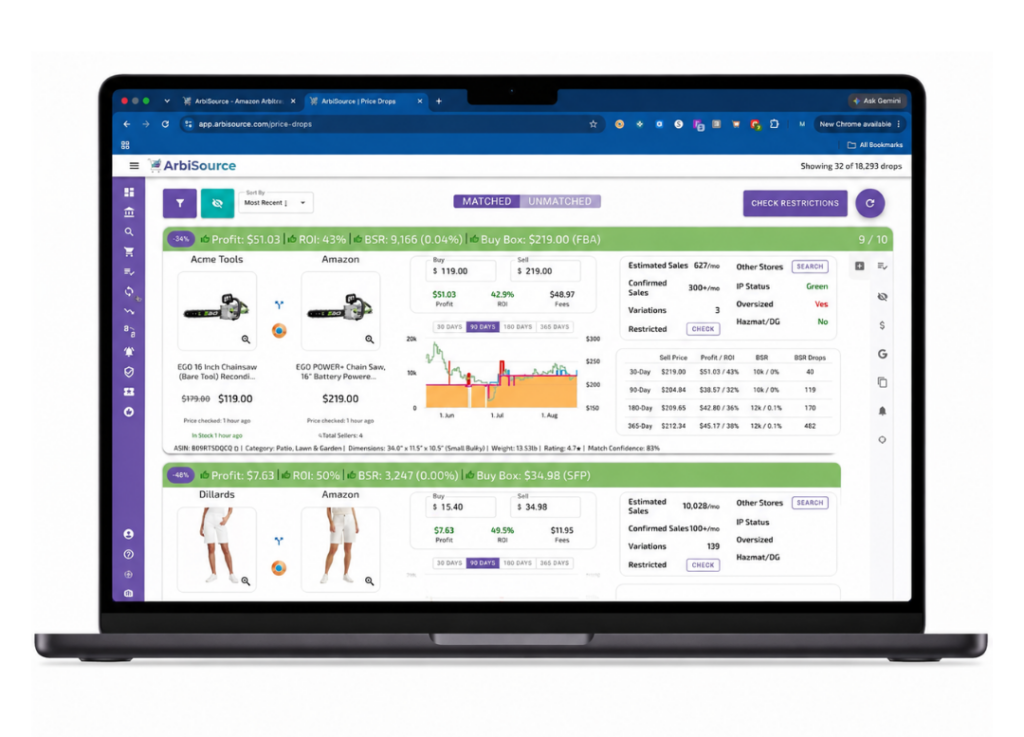
Price Drops is one of the easiest places to start. It gives you a continuously updating feed of leads, including the source price, Amazon price, retailer, and estimated profit data.
One example showed an item at Acme Tools for $1.19 and an Amazon selling price of $2.20. In SellerAmp SAS, that worked out to roughly $0.40 profit and a 33% ROI after the relevant costs. That looks simple on paper, but you still need to verify the exact product. Check the brand, size, count, model, variation, and condition. A matching image isn’t enough!
A higher-priced lead showed a purchase price around $15.40 and an Amazon price near $35. Looks good initially doesn’t it? And discounted gift cards can make it better, but Amazon was also selling on the listing. A profitable-looking lead can turn into a bad buy if Amazon returns to stock or the historical price sits far below today’s price.
Filter Out Leads You Don’t Want
The Price Drops filters let you tighten up the feed based on discount, profit amount, ROI, velocity, and estimated monthly sales. Raise your minimums and you’ll see fewer leads. Loosen them and you’ll get more to review.
You can also save a filter set, which matters once you know the type of leads you want to see every day. One filtered lead in the feed showed a source price around $7.60, about $9 profit, and a 119% ROI. Great numbers, but still check stock, gating, sales history, and whether the item is truly the same product.
Run Scans by Category, Store, or Seller ID
Scans are where ArbiSource gets more targeted. Instead of waiting for a feed, you tell the tool what to search.
For Q4, Toys and Games is an obvious category to test. Pick the category, start the scan, then review the results. A broad toy scan in the walkthrough returned about 75 results, while a large catalog scan reviewed nearly 700,000 ASINs in a few minutes before narrowing them down to 173 matching leads.
Not every result will be a winner. That’s normal. You get better results by refining your filters around what you can sell and what you want to ship.
Search Retailers When a Deal Is Live
ArbiSource includes roughly 800 retailers. You can run scans around a retailer’s sale, clearance section, or coupon event, including stores such as Walmart, Target, Walgreens, and Belk.
For example, you can select Target, search “clearance,” choose all matching results, and start a scan. A store-only scan will usually return fewer results than an entire catalog scan, but it’s more focused when you know the retailer has a deal running.
If you source from Walmart or Best Buy, confirm the item is sold and shipped by Walmart.com or sold and shipped by Best Buy. Their marketplaces include third-party sellers, and that can create authenticity concerns or make a source less reliable.
You can also use a seller ID for a more advanced reverse search. If you find a seller storefront worth studying, pull the seller ID through SellerAmp and run a search around it.
Check the Deal in SellerAmp Before You Buy
ArbiSource finds the lead. SellerAmp is where you pressure-test it!
A Mega Bloks example was available at Walmart for about $14.97. It showed about $5 profit, a 36% ROI, and a strong sales rank. Those are the types of numbers worth investigating, assuming you’re approved to sell the brand and the listing checks out.
Amazon’s selling fee schedule is a reminder that fee assumptions matter. Your SellerAmp calculation needs the right selling price, source cost, taxes, prep costs, and fulfillment method.
Read the Price and Competition History
A current margin doesn’t tell you how the listing behaves. Check historical pricing, sales rank movement, and Amazon’s history on the listing.
If Amazon regularly sells the item at $12, but third-party sellers are temporarily asking $26 to $29, that higher price may not last. Likewise, a slow-moving item can hold up your cash even if the margin looks solid.
Some listings have no Buy Box because the product is widely available online and Amazon can easily match lower prices. You can exclude those results in ArbiSource if you only want listings with an active Buy Box. You should also check your selling eligibility before getting attached to a Q4 toy lead.
Add Gift Cards, Coupons, and FBM Math
Discounted gift cards can change a pass into a buy. In one Bloomingdale’s example, adding about 9.8% off through discounted gift cards changed the numbers to roughly $13 profit and 42% ROI.
Calculate the gift card discount before you make the buying decision! It belongs in your source cost, not in a rough estimate after the fact.
Retailer promotions can also improve a deal. Target had an offer for a $15 gift card with a $50 household purchase. Rather than placing one large order, you could structure multiple orders slightly above $50 to maximize the gift cards. The same logic applies to a Walgreens $10-off-$50 offer.
For smaller products, compare FBA and FBM in SellerAmp. Items above $20 but below one pound can sometimes produce better margins through FBM. One five-ounce item showed nearly the same FBA and FBM margin, while a dangerous-goods classification meant a newer seller would need to fulfill it themselves.
Amazon’s 2026 FBA fee update is another reason to keep your calculator inputs current.
Put the Two Tools Together
ArbiSource is most useful when you don’t treat it like an automatic buy button. Use it to find more leads, filter out obvious weak spots, and run focused searches around categories, retailers, and active promotions.
Then use SellerAmp SAS to verify the product match, fees, restrictions, competition, profit, ROI, and FBA versus FBM options. You can start a free 2 week SellerAmp SAS trial to put that workflow into practice, just hit the button below!
The faster you get at filtering and verifying, the less time you spend chasing leads that were never worth buying.